Industry Served: EdTech
OnWard Education, AI-Assisted Clinical Training for Medical Students
A Mobile App and Two Web Portals Turning Every Patient Encounter Into Measurable Learning
What Happens at the Bedside, Made Visible
Discuss your projectA medical student takes a patient history on a ward round. Whether the right questions were asked, whether the examination was thorough, and whether anything important was skipped is largely invisible to the college afterwards. Clinical placements are where students learn most, yet they are the hardest part of a medical programme to assess consistently, because the encounter leaves no structured record behind.
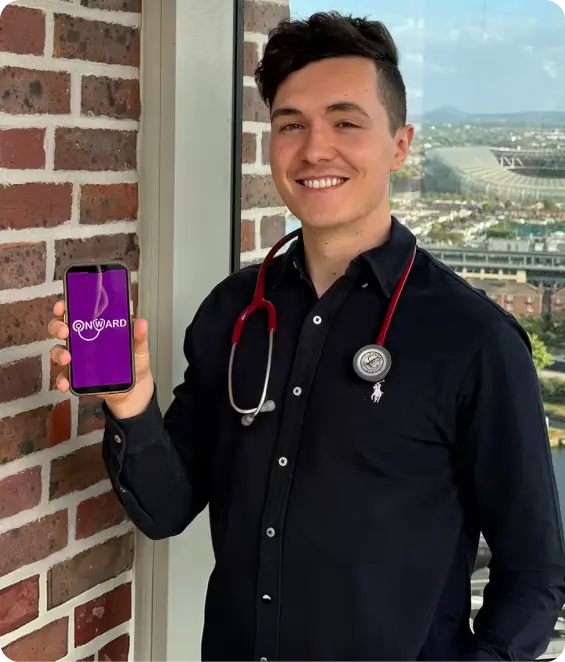
OnWard Education is a MedEdTech company headquartered in Dublin, Ireland, with a mission to transform medical education through AI-integrated solutions tailored to medical schools. It set out to close that gap. The platform gives students a structured way to log patient encounters and selftests on their phone, uses AI to compare what they actually asked against what should have been asked for that diagnosis, and gives faculty the reporting to see how each student, cohort, and placement site is progressing. Flashcards add clinical knowledge revision, with students rating their own confidence on each card. As they put it, students can focus on learning instead of chasing doctors for feedback.
We were the development partner behind the platform, delivering three products: the OnWard student mobile app for Android and iOS, the Educator Portal, and the Admin Interface. The work ran from UI and UX through AI integration, development, and quality assurance. The product is now live on the App Store and Google Play with monthly and yearly subscription plans, is powered by Learnovate, and OnWard is a member of EdTech Ireland.
Transformation To A Next-Gen Platform

Unstructured Clinical Learning
Colleges had little visibility into what students did on placement, so oversight of student development depended on self-reporting.
Free-Text, Consistent Scoring
Students needed to record notes as bullet points, full sentences, or audio, while assessment still had to be uniform across every submission.
Patient Data Protection
Real ward encounters had to be logged with nonidentifiable data only, using bed numbers rather than any patient identity.
Three Roles, One Dataset
Students, college administrators, and the platform team needed very different views over the same encounters, questions, and results.
Our Solution
We developed a scalable, role-based Clinical Training and Assessment Platform enabling:

The three interfaces sit on shared data, so a question set defined once is answered on the ward, scored by AI, and reported to the college without anything being re-entered.
Interfaces We Developed
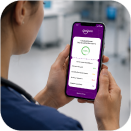
OnWard Student App (Android & IOS)
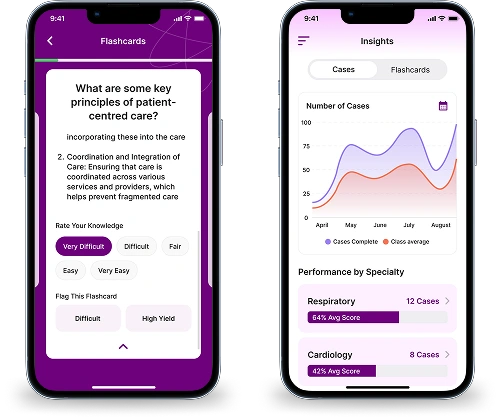
The learner-facing mobile app, used at the bedside and between shifts, built around four functions: Case Presentation, Flashcards, Logbook, and Insights. It allows students to:
- See the patients assigned to them by bed number, with disease and placement site
- Present a case as a physical or self test, working through each question section in sequence
- Record answers as bullet points, sentences, or an audio note, then submit for AI evaluation
- Receive a score and personalised feedback at the touch of a button, with every missed question listed
- Review their logbook and compare their errors against a model answer
- Run flashcards across specialties and diagnoses, rating confidence and flagging cards
- Track insights on their performance over time, across specialties, and against their peers
- Track their profile, weekly patient allocation, and previous results
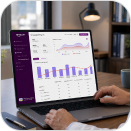
Educator Portal
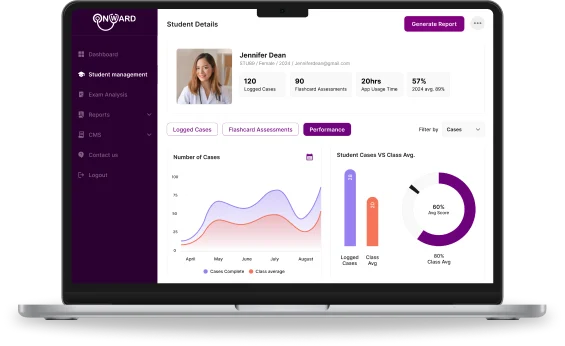
The web portal for each medical school, giving faculty real-time insight into student performance:
- A dashboard of total students, total patients, and self tests taken
- Individual student reports tracking results across time, specialty, and against peers
- Cohort analysis by year group, surfacing trends and the areas where students struggle
- Exam result analysis, comparing app usage retrospectively against end of semester results
- Student onboarding by name, unique identifier, and email, with account setup sent automatically
- Weekly patient allocation per student, editable at any point in the placement
- Comparison of student performance across placement sites and areas of medicine
- App usage and time logs as a measure of student engagement
- Report generation on demand for any student, cohort, or filter combination
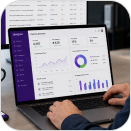
Admin Interface
The platform control layer for the OnWard team, used to:
- Track totals across students, colleges, diseases, and questions on one dashboard
- Onboard colleges and manage their accounts and student rosters
- Build the clinical content library: diseases, sectioned question sets, and filters by organ and transmission
- Author flashcard questions and answers with tags for practice mode filtering
- Review anonymous patient records with disease, questions asked, and attending student
- Assign bed numbers and predefined question sets to individual students
- Read AI evaluation output, self test results, and practice mode confidence tags across cohorts
- Generate analytics filtered by student, group, college, tag, area of medicine, and period
- Maintain CMS pages including terms, privacy, contact, and about
Key Features & Capabilities
AI Evaluation Of Clinical Questioning
Student notes compared against the admin-defined question set for that diagnosis, assessing how thoroughly the patient was questioned and where the interaction fell short.
Any Format In, One Format Out
Bullet points, prose, or an audio note all resolve into the same standardised report, so students document naturally without losing comparability.
Physical And Self Tests
The same structure either way. Physical encounters save to the student log book, while self tests can be attempted anywhere and are not logged.
Flashcards Across Specialties
Clinical knowledge tested by specialty and diagnosis, with students self-rating each card from no clue through to knew it all, giving staff a view of confidence as well as correctness.
Site-By-Site Comparison
Reports filtered by placement location, so colleges can compare how students perform from one hospital site to another.
Anonymous By Design
Patients are held as a bed number and a diagnosis only, keeping real ward encounters usable for teaching with no identifiable data stored.
Outcomes And Impact

Placements Become Measurable
Oversight
Colleges can see patients seen, questions asked, and questions missed per student, where previously clinical learning left no structured record.
Feedback In Minutes
Learning Loop
Students receive a scored breakdown immediately after an encounter rather than waiting for tutor review, so the next patient benefits from it.
Rapid Adoption
Staff Effort
Free-text answers are scored automatically and reported in a consistent format, replacing manual review of every submission.
Rapid Adoption
To Market
Published on the App Store and Google Play on a subscription model, open to all medical students rather than a single institution.
Technologies Used To Develop The Solution
Mobile

Flutter (Android & IOS)
One codebase for the student app, including audio capture and sectioned test flows.
Web Portals

Next.Js
Educator Portal and Admin Interface, dashboards, and report filtering.
Backend
Node.Js
Shared APIs across the app and both portals, with role-based authentication
Ai Evaluation

OpenAI APIs With NLP Comparison
Student text compared against admin answer sets to score thoroughness and identify missed questions.
Audio Notes

Speech To Text Transcription
Recorded questions transcribed before evaluation, so voice input scores the same as typed input.
Database

PostgreSQL
Question sets, encounters, results, and flashcard tags in one structured store.
Reporting

Analytics Layer & Spreadsheet Import
Multi-filter reporting, with uploaded college results mapped onto student records.
Notifications

Push & Transactional Email
Allocation alerts to students and automated account setup invitations.
Security & Hosting

Cloud With Encryption & RBAC
Anonymous patient handling, encrypted data, and separation between medical schools.
Distribution
App Store, Google Play & Subscriptions
Store release pipelines with monthly and yearly subscription billing for individual students.
Here's What Our Client Has To Say
They took the time to understand how clinical teaching actually works before designing anything, which is not something we expected from a development partner. Three products were delivered to a high standard, the AI assessment does exactly what we needed it to do, and the communication was consistent from start to finish. A team we would happily work with again.
Get in touch
Share a few details about what you're building, and we'll take it from there.